 Meta Pixel Diagnostics
Check your Meta Pixel without leaving the page
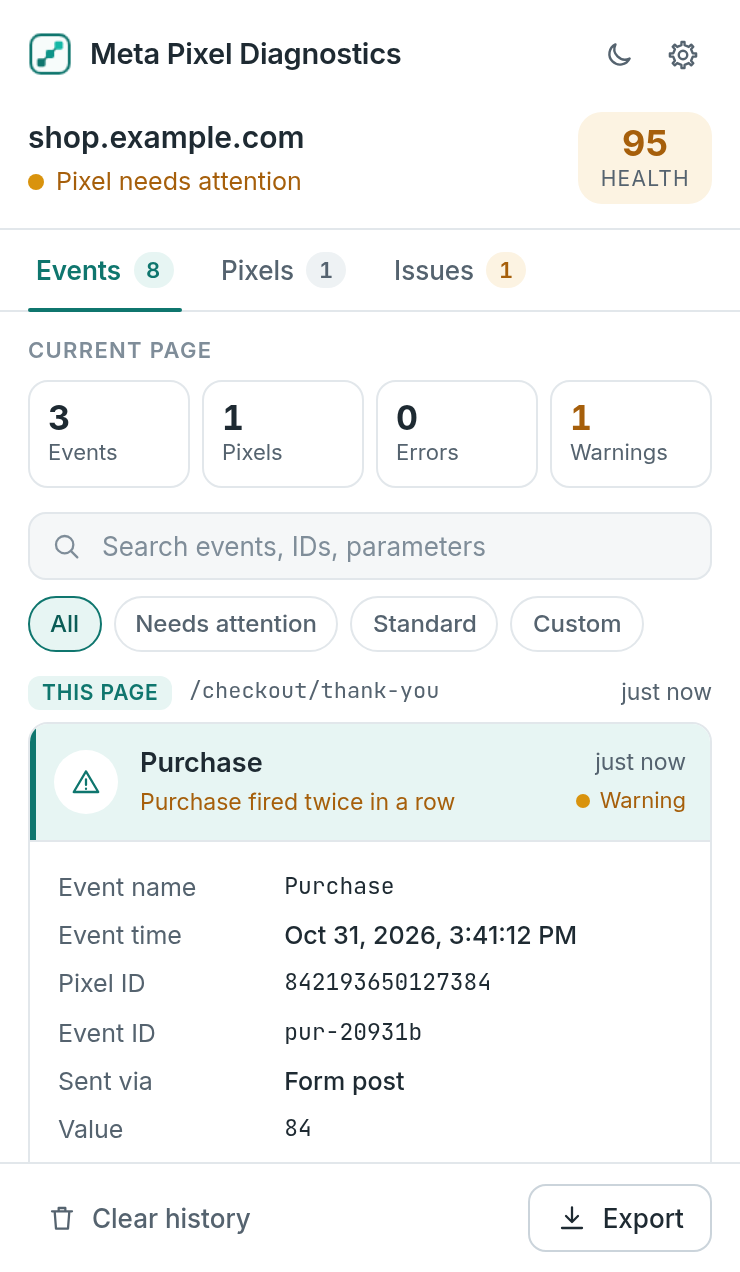
Meta Pixel Diagnostics opens in Chrome's side panel and shows every pixel event as your browser sends it, with readable parameters, duplicate alerts and a clear fix for every problem.
From install to answers in a minute
No setup, no Events Manager login. Open a page and watch what the pixel actually sends.
Open the panel
Click the toolbar icon or press Alt+Shift+D on any website.
Use the site
Reload, browse, add to cart and check out. Events appear live, grouped by page.
Fix what's flagged
Open Issues to see errors, warnings and tips, each with the change to make.
Everything you need to trust your pixel data
Built for marketers, developers and agencies who need to know what a page really sends to Meta.
Live event timeline
Every PageView, AddToCart, Purchase and custom event, grouped by page and by single-page view, newest first.
Readable parameters
value, currency, content_ids and custom data shown as highlighted JSON you can copy in one click.
Fixes, not just flags
40 browser-side checks, each with a plain-language explanation and the exact change to make.
Pixel setup at a glance
Init calls, library status, consent, Limited Data Use, _fbp and _fbc, and hashed customer fields.
Duplicate alerts
See when the same event fires twice, when an event_id is reused, or when a pixel is initialized twice.
Export and share
Download the timeline as JSON or CSV for a developer, agency or client, with no account needed.
Errors explained in plain language
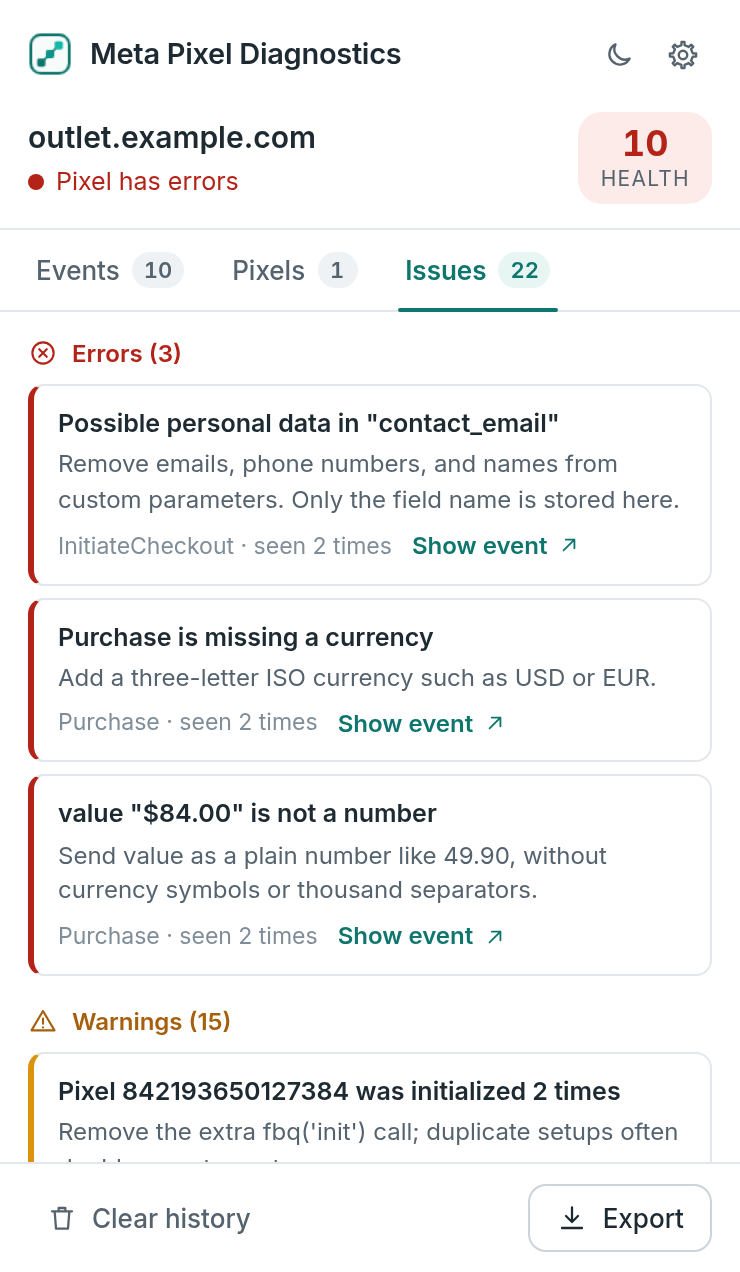
The Issues tab ranks what matters most on the current page and tells you exactly what to change. Jump from any issue straight to the event that caused it.
- Page health score from 0 to 100
- Errors, warnings and tips kept apart
- Repeated problems grouped with a count
Know which pixels run, and how
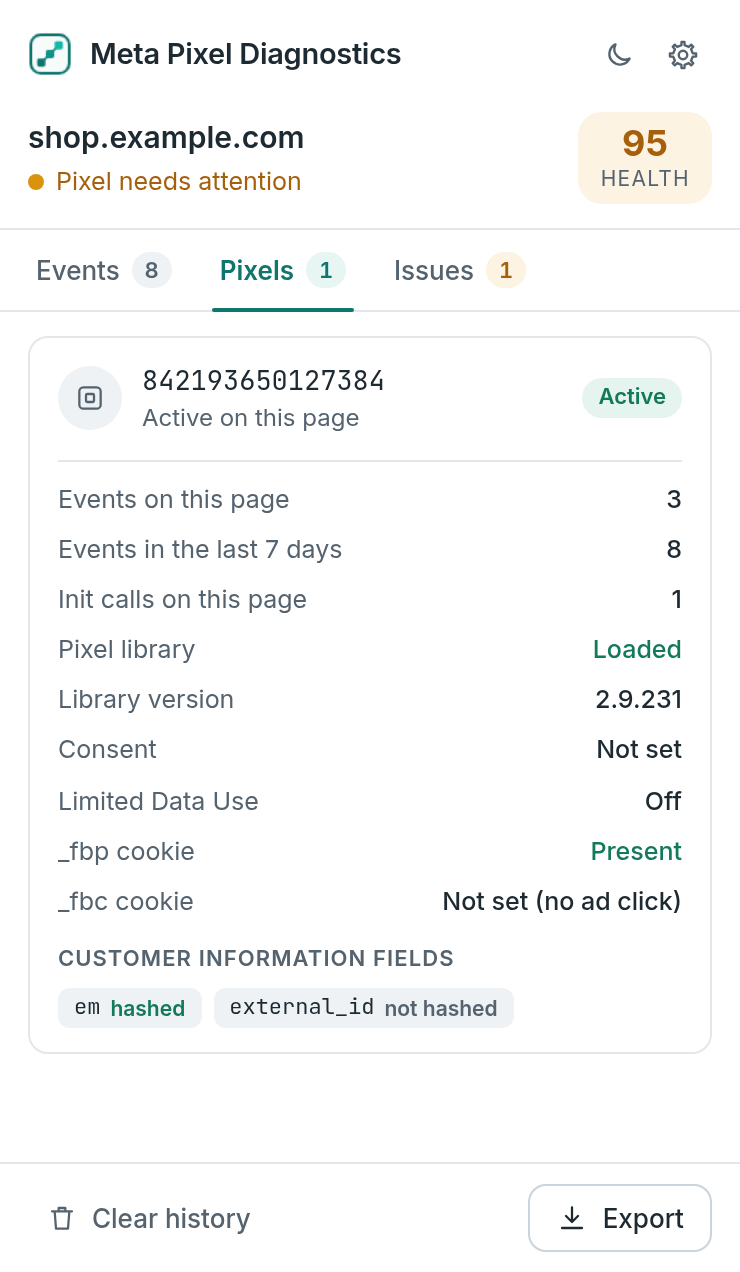
One card per pixel ID shows init calls, library status, consent, Limited Data Use and cookies, plus which customer fields were hashed.
- Spot double initialization
- See _fbp and _fbc at a glance
- Customer values are never stored
The problems that quietly break attribution
Every event is checked against Meta's standard events and parameters as soon as it is sent.
Revenue
- Purchase without value or currency
- Value sent as text or with a symbol
- Invalid or lowercase currency code
- Zero or negative values
- Missing order_id
Catalog
- Missing content_ids or contents
- content_ids sent as text, not a list
- Empty product IDs
- Unusual content_type
- num_items that is not a whole number
Naming
- Typos like currency_code or product_id
- Custom events that should be standard
- Events without a name
- Over-long custom event names
- Recommended parameters missing
Customer data
- Customer fields sent without hashing
- Unknown advanced matching keys
- Emails or phones in custom parameters
- Email addresses in the page URL
Setup
- No PageView on the page
- Pixel initialized more than once
- Pixel code present, library not loaded
- fbq calls that were never sent
- Consent revoked and Limited Data Use
Matching & dedup
- Missing _fbp browser cookie
- fbclid present but no _fbc cookie
- Missing or reused event_id
- Duplicate fires within 2 seconds
- Event bursts from loops
Private by design
Meta Pixel Diagnostics works entirely in your browser. There is nothing to sign up for and nothing is sent anywhere.
Browser-side only. The extension shows what your browser sends to Meta. It cannot see server-side Conversions API events, and event_id checks only help you prepare deduplication.
Questions, answered
Does it check the Conversions API?
No. Meta Pixel Diagnostics shows browser-side pixel activity only. Server-side Conversions API delivery is not visible in the browser. The event_id checks help you prepare deduplication, but they cannot confirm that Meta received a server event.
Is it free?
Yes. There is no account, no subscription and no usage limit.
Does it send my data anywhere?
No. Captured events stay in your browser's local storage on your device and are removed automatically after 7 days. The extension makes no network requests of its own.
Why does a page show no events?
Some sites wait for cookie consent before the pixel sends anything, and ad blockers can stop the pixel library from loading. Accept consent or allow the site, then reload the page so the panel can capture events from the start.
Does it work on Shopify and WooCommerce?
Yes. It watches the pixel requests themselves, including the hidden form posts used by the current pixel library, so it works the same way on any platform or tag manager.
Is this the official Meta Pixel Helper?
No. Meta Pixel Diagnostics is an independent tool with its own checks and design. It is not affiliated with Meta.
See what your pixel really sends
Free for Chrome. Local, private and ready in seconds.